

Scripture
Find and present Bible passages.
On this page
Manual search
Use Book search to enter a reference and select a translation. Add passages to the queue and check the program preview before presenting.
Spoken references
Choose Start transcribing. Recent detections separates direct references from semantic suggestions. Review suggestions before presenting them.
Auto mode can advance presentation from detections. Check the Live control and audience screen before using it.
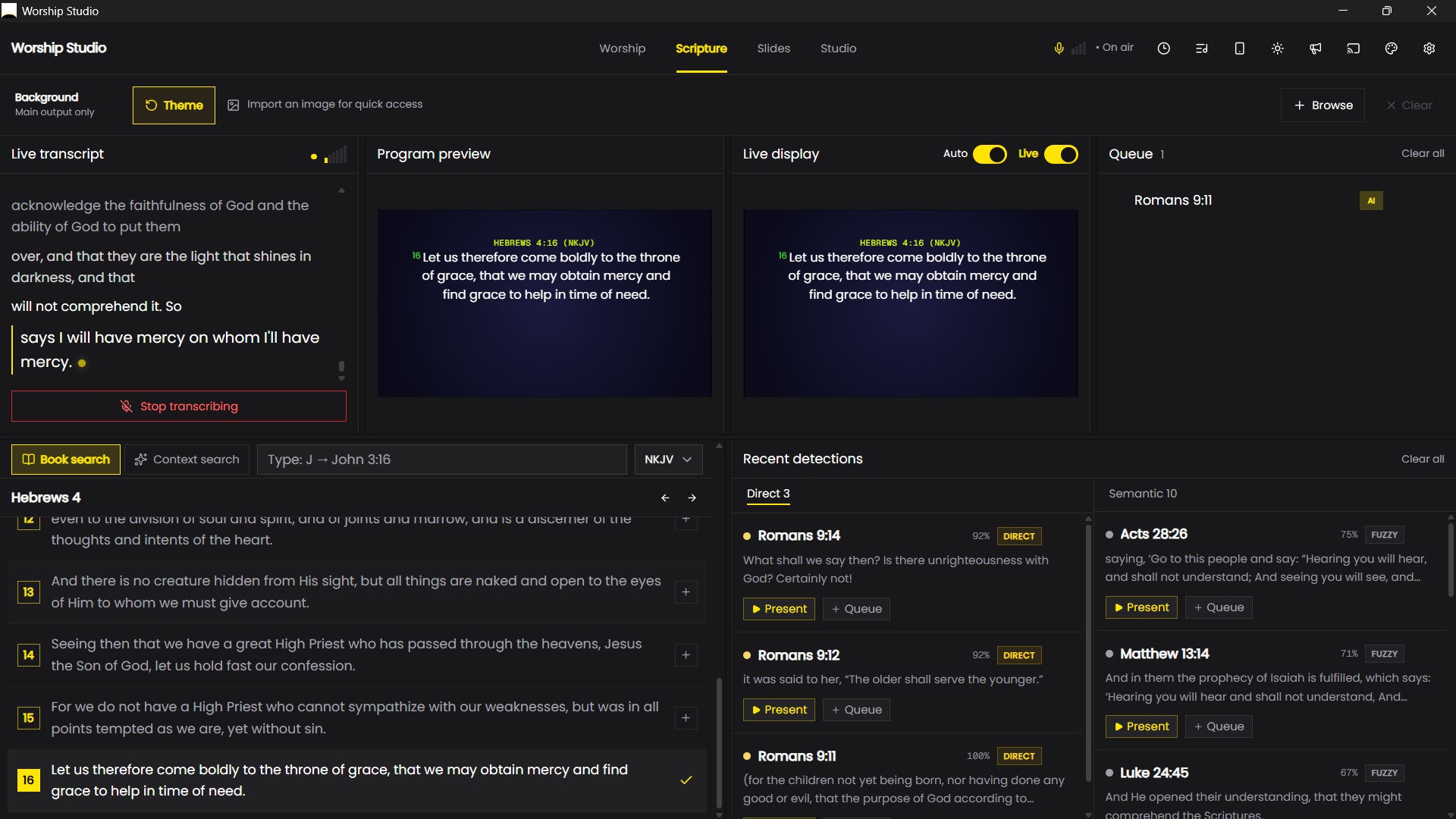
Read the pipeline
The transcript records what the speech engine heard. Detections are candidate passages. Search supplies a manual fallback. The queue prepares passages for later; the output preview shows presentation state.
Investigate the transcript first when a result is wrong. A mistaken book name or number can produce a plausible but unwanted passage. Use manual search instead of waiting for the preacher to repeat it.
Direct versus semantic matches
A direct reference identifies a book, chapter or verse, such as “Romans chapter eight verse twenty-eight.” Semantic suggestions match quoted or paraphrased wording. Several passages can share similar wording, so inspect the full text and context.
Confidence measures matching, not the certainty of the speaker's intention. Audio, provider, wording and PC load affect results; another application's timing claims do not describe this build.
Auto and Manual
Settings → Display Mode controls automatic presentation. Manual leaves the choice to you. Auto can present qualifying results after its checks and cooldown; adjust Confidence Threshold if you need stricter matching.
Live state and output routing are separate from detection. Rehearse in Manual: recognise one correct passage, present it and check the real screen before using Auto.
Reading context
Continuation phrases such as “verse ten” need a preceding book and chapter. Watch the resolved reference, especially when the speaker changes passages. Use manual selection if context has become ambiguous.
Continue with Bible search, speech setup and presentation controls.